Web Scraper Cloud
Cloud workflow
- Create and validate the sitemap in the browser extension.
- Sync or import the sitemap into Web Scraper Cloud.
- Configure the driver, request interval, page load delay and proxy.
- Run the job and inspect page outcomes and records.
- Configure scheduling, parsing, notifications and exports after the test result is correct.
URL credits
One URL credit is charged for each page loaded by Cloud. The number of rows extracted from that page does not change the charge. Re-scraping of empty and failed pages does not consume additional URL credits.
Parallel tasks
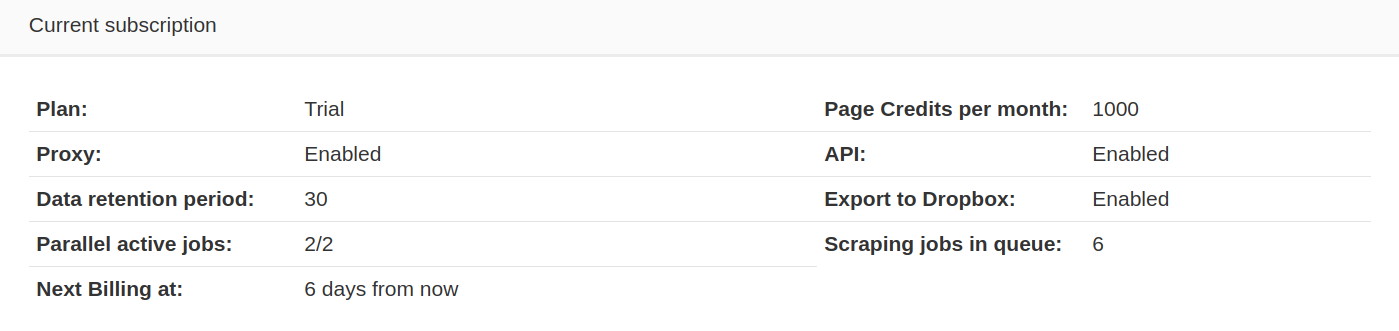
Parallel tasks determine how many scraping jobs can run at once. Additional jobs are queued until a task becomes available. Active and queued job counts are available in the subscription manager.
A single scraping job also parallelizes internally. When at least 250 URLs are still queued and additional slots are free, the remaining work is split into smaller tasks that run in parallel. Below that threshold, or when no slots are free, the job continues processing normally.
Drivers
- Full: loads the page in a browser environment, loads assets and executes JavaScript before extraction.
- Fast: extracts from the returned HTML without executing page JavaScript.
Job outcomes
- Failed pages - Pages that returned a 4xx or 5xx response or did not load.
- Empty pages - Pages that loaded successfully but produced no extracted record.
- No-value pages - Pages where matching elements were found but no populated values reached the final dataset.
Cloud automatically re-scrapes empty and failed pages. Remaining pages can be inspected and, where appropriate, continued manually.
Current sitemap execution limits
- 20,000 start URLs.
- 100 selectors.
- 10 minutes of continuous JavaScript execution per URL. This applies to JavaScript-driven actions such as clicking and scrolling, not to the total data-extraction time for the URL.
Difference between scraping on Web Scraper Cloud and the Web Scraper browser extension
| Web Scraper Cloud | Web Scraper browser extension |
|---|---|
| Designed for consistent automated access. Cloud jobs can use proxy rotation, retries and failover behavior to reduce interruptions while scraping. | Runs through the local browser and is limited to the website access available from that browser session. |
| Stores data from scraping jobs in Cloud for the applicable data-retention period. | Stores only the latest local scraping-job data in the browser's local storage. |
| Does not load images while scraping, reducing unnecessary page-load time and transferred data. | Loads images as part of the normal browser page. |
| Traverses discovered URLs in pseudo-random order. This helps distribute extraction across a larger crawl instead of completing one discovery branch first. | Traverses URLs in last-in, first-out order based on discovery order. |
| Supports unattended execution, scheduling, API access, exports, proxies, monitoring and other Cloud automation features. | Runs locally and is best suited to building, testing and running sitemaps directly in the browser. |